Thursday, 10 May 2012
BA3 - RESULT
Today we did our presentation for our Contextual Studies project! Overall, i think we did well! We all knew what we were talking about, there were no major pauses and i think we all delivered it well. We were nervous and you could tell a bit but that will get better with time and practice! We did run over slightly but that was not a major issue. The topic we chose was broad but i think we delivered as much and enough information to cover 10 minutes.

BA3 - LEARNING
With Maya i have learned a lot and still am! Here are some points as to what i have learned so far on how to do certain things in Maya:
When creating anything in Maya don't create faces that can not be seen in game! this is because when running the game it can cause it to lag so it is unnecessary to have faces not being shown.
Beveling and Extruding an object pushes or sinks in an area of the object. This can create many things and can combat the problem from the point above - you can push an object out instead of creating a new object which creates unseen and unnecessary faces. You can find the Beveling and Extruding option under Edit Mesh.
You can break up objects into sections using the Cut Faces tool. This tool lets you cut an object with a straight line but it is dependent on the current camera angle. It is handy to break up objects for rendering or to delete edges and faces. You can also use the Interactive Split Tool/Split Polygon Tool which lets you cut up objects by free hand. Both options can be found under Edit Mesh.
UV Texture Maps basically show the net of a 3D object making it flat e.g. if you get a cereal box and unglued the seams it will be a flat net of that 3D object. With this we can save that net into a PSD file for Photoshop, paint over it and then put it back onto Maya where it will then wrap that net around the 3D object, creating a textured and rendered object. Here i will show a step by step guide on how to create a UV Texture Map.
To create a UV Texture Map first select the object with the Select By Object Type option.
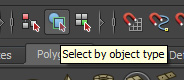
Next click on the UV Texture Map icon.

With the UV Texture Map now up (if needed) find out the areas that you may be applying detail to in photoshop and make a note. e.g. since i am creating a door there will be sections where the wood is coloured and there will be hinges on the door so i need to find out where they are so i can detail them. You can find this out my selecting a face on the 3D object which will be highlighted on the UV Texture Map.

On the image above, on the Left is the 3D object and on the right is the UV Texture Map.
On the image below you can see that i have selected one of the faces on the 3D object which has shown up on the UV Texture Map, singling out the face i have selected. You can select multiple faces as well which will single out and show up on the UV Texture Map.

Now we need to create a Lambert onto the selected object, this will allow us to wrap our image around the selected object.
First, select the object then right click and go down to faces, then to Assign Favorite Material then select Lambert. And then you have created a Lambert!!

Next (making sure the object is selected!) on the UV Texture Map click Image then Create PSD Network and it will come up with this:
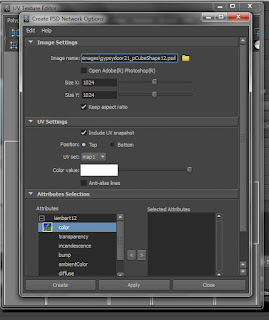
Now, click the file button at the top left and choose where to save your file and what name to save it as. At the bottom under Attributes you should see the Lambert you have just created. Click colour then the right arrow which will then move it to the box next to it called Selected Attributes.
And then click create! The UV Texture Map will have saved into a PSD file ready to be moved onto Photoshop to colour. Before you start though, in Photoshop flatten your image because you cant paint under the the background or the UV map as Maya wont be able to wrap the image around the object properly, the colour has to go over the UV Texture Map.
*********************TIP*********************
Rather than selecting the WHOLE object to create into a UV Texture Map, do so in sections as when you select the whole object and then look at its UV Texture Map it will be everywhere and parts will overlap and you wont be able to tell which is what part, consequently you wont be able to colour it in Photoshop accurately!
When creating anything in Maya don't create faces that can not be seen in game! this is because when running the game it can cause it to lag so it is unnecessary to have faces not being shown.
Beveling and Extruding an object pushes or sinks in an area of the object. This can create many things and can combat the problem from the point above - you can push an object out instead of creating a new object which creates unseen and unnecessary faces. You can find the Beveling and Extruding option under Edit Mesh.
You can break up objects into sections using the Cut Faces tool. This tool lets you cut an object with a straight line but it is dependent on the current camera angle. It is handy to break up objects for rendering or to delete edges and faces. You can also use the Interactive Split Tool/Split Polygon Tool which lets you cut up objects by free hand. Both options can be found under Edit Mesh.
UV Texture Maps basically show the net of a 3D object making it flat e.g. if you get a cereal box and unglued the seams it will be a flat net of that 3D object. With this we can save that net into a PSD file for Photoshop, paint over it and then put it back onto Maya where it will then wrap that net around the 3D object, creating a textured and rendered object. Here i will show a step by step guide on how to create a UV Texture Map.
To create a UV Texture Map first select the object with the Select By Object Type option.
Next click on the UV Texture Map icon.

With the UV Texture Map now up (if needed) find out the areas that you may be applying detail to in photoshop and make a note. e.g. since i am creating a door there will be sections where the wood is coloured and there will be hinges on the door so i need to find out where they are so i can detail them. You can find this out my selecting a face on the 3D object which will be highlighted on the UV Texture Map.

On the image below you can see that i have selected one of the faces on the 3D object which has shown up on the UV Texture Map, singling out the face i have selected. You can select multiple faces as well which will single out and show up on the UV Texture Map.

Now we need to create a Lambert onto the selected object, this will allow us to wrap our image around the selected object.
First, select the object then right click and go down to faces, then to Assign Favorite Material then select Lambert. And then you have created a Lambert!!

Next (making sure the object is selected!) on the UV Texture Map click Image then Create PSD Network and it will come up with this:

Now, click the file button at the top left and choose where to save your file and what name to save it as. At the bottom under Attributes you should see the Lambert you have just created. Click colour then the right arrow which will then move it to the box next to it called Selected Attributes.
And then click create! The UV Texture Map will have saved into a PSD file ready to be moved onto Photoshop to colour. Before you start though, in Photoshop flatten your image because you cant paint under the the background or the UV map as Maya wont be able to wrap the image around the object properly, the colour has to go over the UV Texture Map.
*********************TIP*********************
Rather than selecting the WHOLE object to create into a UV Texture Map, do so in sections as when you select the whole object and then look at its UV Texture Map it will be everywhere and parts will overlap and you wont be able to tell which is what part, consequently you wont be able to colour it in Photoshop accurately!
BA3 - RENDERING

Here i have started texturing and rendering! some detail has been applied. feedback would be great!
wood texture:
http://www.flickriver.com/groups/woodknots/pool/interesting/
Monday, 30 April 2012
BA3 - Contextual studies
For contextual studies we have to work in groups and present a 10 minute presentation to do with a topic looking at Eastern and Western games. I am working with David, Aubry and Adam and together we are looking at stereotypes and racism in characters characterization and personas in Eastern and Western games (this is a working title!). The points we want to cover are looking at stereotypical men and women from the west, stereotypical men and women from the east, looking at how westerners are portrayed in western and eastern games, how easterners are portrayed in western and eastern games, looking into that culture to see why they are portrayed in certain ways and to see if common stereotypical traits in westerners and easterners are found in games and what the public think of westerners and easterners.
We are going to look more specifically at Americans and the Japanese as looking at all westerners and easterners is far too large and general and there are many stereotypes for every race, country and culture.
When looking into games for how characters are portrayed, we need to keep in mind if the games are being released internationally or to only one or several selected countries as, depending on the audience the characters could appear different/not as strong stereotypes in order for the game to sell well.
The topic i am covering is looking at Stereotypical eastern males and females and to look into why they are portrayed the way they are by looking at their culture and finding examples in games.
For some eastern made games that display stereotypical eastern qualities i am going to look at soul caliber, Catherine, and Final Fantasy.
the Final Fantasy series is interesting, as the games do have western looking characters and some western characterization/personas e.g. Final Fantasy 7's Cloud, but others display very eastern qualities e.g. Final Fantasy 13's Snow.
Some stereotypical western qualities are :
Some stereotypical eastern qualities are:
Information from:
http://www.slantedmagazine.com/geek/are-you-a-stereotypical-asian
http://www.youtube.com/watch?v=VDjgfWAL5UQ
http://www.youtube.com/watch?v=n2Y9oALKb88
http://www.youtube.com/watch?v=WJTFCQkiqhw
For the cultural aspect as to what brought about/stimulates the stereotype views i have decided to look at anime/manga as that is a major and influential part of their culture and there are many games hevily influenced by the anime/manga art style and character development. I have also decided to look at the eastern film Enter The Dragon and the western film The Fast and Furious : Tokyo Drift. Even though Enter the Dragon was a Chinese film and not Japanese, it is still a highly influential film and supports the western view of easterners being able to do martial arts. It also hosts western characters and how easterners portray western men and women. For The Fast and Furious : Tokyo Drift it is heavily based in the east and it shows a westerners views to how easterners act and behave.
I have also been looking into Japans history and how that has framed their culture today. Gender inequality changed over time. In the twelfth century women could inherit and manage their own property in their name. But later on equality had declined and only in 1986 the Equal Employment Opportunity Law came for women to have equal job opportunities.
The term "good wife, wise mother" is a term that many women followed in their daily lifes and still do as they are expected to be stay at home mothers looking after the house by doing chores and going on to managed the houses budget, the families life style, education, careers and thus were blamed for the families problems.
This could explain why women are portrayed as both submissive and feminist characters; they are expected to be stay at home mothers looking after the children and seeking enjoyment and fulfillment from looking after the house (submissive) but also have independence and responsibility as to how the children should be brought up, the household budget and the families life style (feminist). A more feminist character would also seem appealing as they would seem strong and independent, different from what society expects from young women.
Source:
http://www.gojapango.com/culture/japanese_women.html
Looking at games made by the east to look western i have decided to look at Silent Hill 2, and Metal Wolf Chaos. Silent Hill 2 is a survival horror game created to be released internationally and is loved by both easterners and westerners alike. Metal Wolf Chaos on the other hand was made only to be released in the east and for westerners makes no sense what so ever with how the characters act and how they are portraid.
Take a look for yourself:
http://www.youtube.com/watch?v=SEIi3X9NCMU
The game is based in America and you play the American President with a mission to restore freedom to America as the evil vice president took over America and took away the peoples freedom. Only your PA and massive Mech suit are able to save the day.
Even though this is based in America with Western characters, it is still very eastern with the characterisation of the characters (especially the villan) and shows how the easterners perceive Americans.
We are going to look more specifically at Americans and the Japanese as looking at all westerners and easterners is far too large and general and there are many stereotypes for every race, country and culture.
When looking into games for how characters are portrayed, we need to keep in mind if the games are being released internationally or to only one or several selected countries as, depending on the audience the characters could appear different/not as strong stereotypes in order for the game to sell well.
The topic i am covering is looking at Stereotypical eastern males and females and to look into why they are portrayed the way they are by looking at their culture and finding examples in games.
For some eastern made games that display stereotypical eastern qualities i am going to look at soul caliber, Catherine, and Final Fantasy.
the Final Fantasy series is interesting, as the games do have western looking characters and some western characterization/personas e.g. Final Fantasy 7's Cloud, but others display very eastern qualities e.g. Final Fantasy 13's Snow.
Some stereotypical western qualities are :
- Dumb blonde tan girls that love to go shopping
- Drink a lot
- like wrestling and Nascar
Some stereotypical eastern qualities are:
- quiet glass wearing geniuses
- all good at maths
- can dance or do martial arts
- parents are insanely strict
- eat cats/dogs
- the women are submissive
- they have cool hair
Information from:
http://www.slantedmagazine.com/geek/are-you-a-stereotypical-asian
http://www.youtube.com/watch?v=VDjgfWAL5UQ
http://www.youtube.com/watch?v=n2Y9oALKb88
http://www.youtube.com/watch?v=WJTFCQkiqhw
For the cultural aspect as to what brought about/stimulates the stereotype views i have decided to look at anime/manga as that is a major and influential part of their culture and there are many games hevily influenced by the anime/manga art style and character development. I have also decided to look at the eastern film Enter The Dragon and the western film The Fast and Furious : Tokyo Drift. Even though Enter the Dragon was a Chinese film and not Japanese, it is still a highly influential film and supports the western view of easterners being able to do martial arts. It also hosts western characters and how easterners portray western men and women. For The Fast and Furious : Tokyo Drift it is heavily based in the east and it shows a westerners views to how easterners act and behave.
I have also been looking into Japans history and how that has framed their culture today. Gender inequality changed over time. In the twelfth century women could inherit and manage their own property in their name. But later on equality had declined and only in 1986 the Equal Employment Opportunity Law came for women to have equal job opportunities.
The term "good wife, wise mother" is a term that many women followed in their daily lifes and still do as they are expected to be stay at home mothers looking after the house by doing chores and going on to managed the houses budget, the families life style, education, careers and thus were blamed for the families problems.
This could explain why women are portrayed as both submissive and feminist characters; they are expected to be stay at home mothers looking after the children and seeking enjoyment and fulfillment from looking after the house (submissive) but also have independence and responsibility as to how the children should be brought up, the household budget and the families life style (feminist). A more feminist character would also seem appealing as they would seem strong and independent, different from what society expects from young women.
Source:
http://www.gojapango.com/culture/japanese_women.html
Looking at games made by the east to look western i have decided to look at Silent Hill 2, and Metal Wolf Chaos. Silent Hill 2 is a survival horror game created to be released internationally and is loved by both easterners and westerners alike. Metal Wolf Chaos on the other hand was made only to be released in the east and for westerners makes no sense what so ever with how the characters act and how they are portraid.
Take a look for yourself:
http://www.youtube.com/watch?v=SEIi3X9NCMU
The game is based in America and you play the American President with a mission to restore freedom to America as the evil vice president took over America and took away the peoples freedom. Only your PA and massive Mech suit are able to save the day.
Even though this is based in America with Western characters, it is still very eastern with the characterisation of the characters (especially the villan) and shows how the easterners perceive Americans.
Tuesday, 17 April 2012

BA3 - LOOK AT WHAT I DID

so far this is what i have done for the gypsy caravan door! i am happy that i am finally getting to understand maya alot better than last term so this is an achievement !
BA3 - START
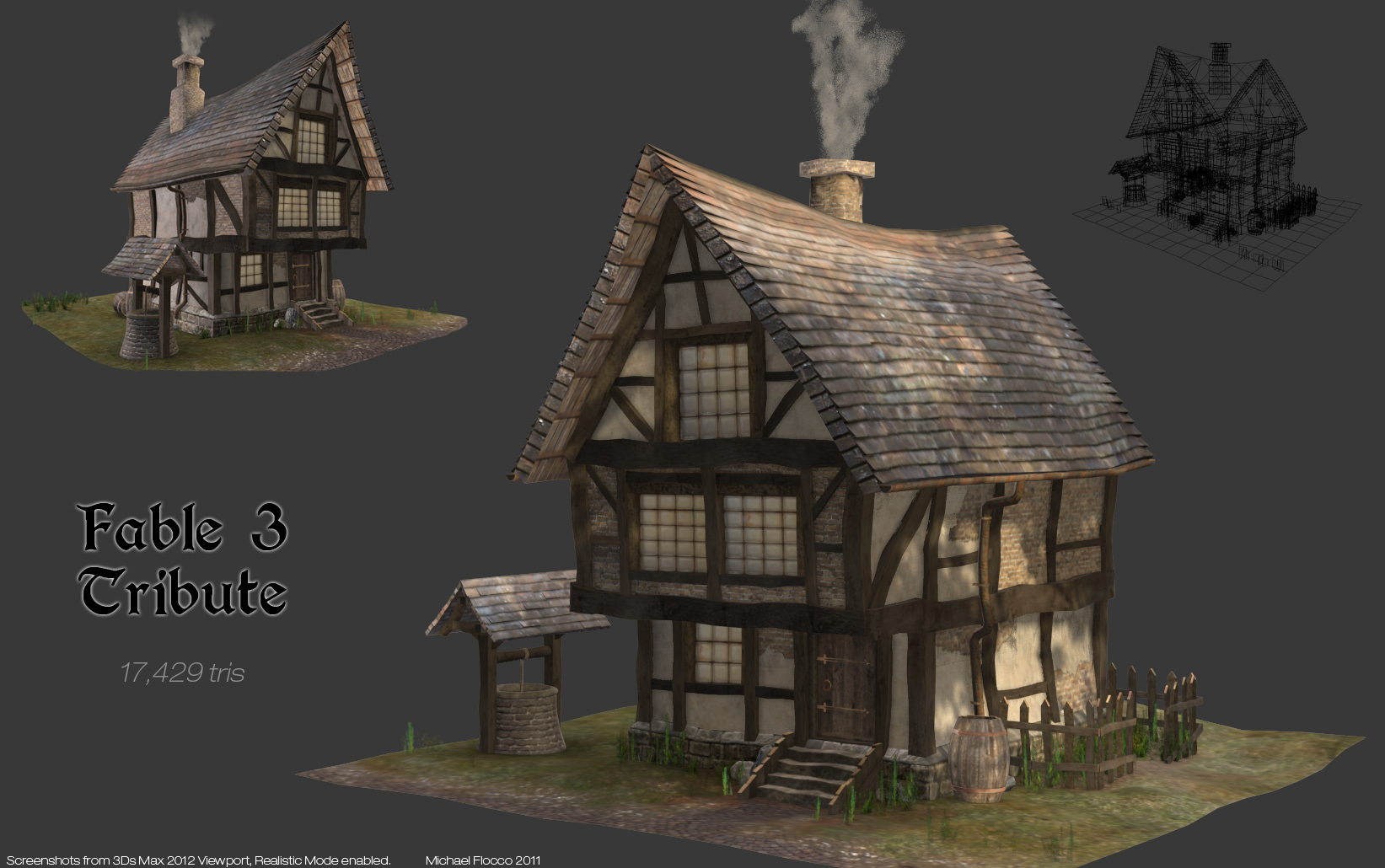
long time no post! well it's now the last term of university and it's time to get to work! Our project is to think of a game and research into its architecture and create a 3D door or window that would fit into that game. After a long thought, I have chosen to do Fable 3 as it has a semi realistic style to its architecture i.e. the buildings look real but are curved at the sides giving the buildings character and a cartoony look.
The setting of Fable 3 is a fantasy industrial revolution theme. Not only is it set in an industrial city alot is also set in the countryside giving an even larger range of doors/windows to choose from. When thinking about what door or window to base my design off it was so difficult because there are many areas in Fable 3 with buildings that also have different designs to them e.g. there are noble houses, commoner houses, gypsy caravans, dungeon doors, cave doors, dweller houses, the environmentalist houses, mansion houses, gates, tombs, factories, demon doors e.t.c.


 Because i am not good at all at using Maya (the program we are using to build this in) i decided to try and go for something fairly seemingly simple but also fun to design. I didnt really do that and i decided to do a gypsy caravan door. The gypsy caravan doors in the game are actually quite detailed with embeleshment. But it was rather fun to design and i hope i can create it and make it look rather good!
Below is the gypsy door that i got my main source of inspiration.
Here is my door from the front, top and side. It is very influenced by the fable gypsy doors as i wanted it to fit into the game well but also be rather different.


The setting of Fable 3 is a fantasy industrial revolution theme. Not only is it set in an industrial city alot is also set in the countryside giving an even larger range of doors/windows to choose from. When thinking about what door or window to base my design off it was so difficult because there are many areas in Fable 3 with buildings that also have different designs to them e.g. there are noble houses, commoner houses, gypsy caravans, dungeon doors, cave doors, dweller houses, the environmentalist houses, mansion houses, gates, tombs, factories, demon doors e.t.c.


.jpg)
 Because i am not good at all at using Maya (the program we are using to build this in) i decided to try and go for something fairly seemingly simple but also fun to design. I didnt really do that and i decided to do a gypsy caravan door. The gypsy caravan doors in the game are actually quite detailed with embeleshment. But it was rather fun to design and i hope i can create it and make it look rather good!
Below is the gypsy door that i got my main source of inspiration.
Here is my door from the front, top and side. It is very influenced by the fable gypsy doors as i wanted it to fit into the game well but also be rather different.
Below are some sketches of doors in Fable. one is a gypsy door, the other a castle door.

Subscribe to:
Posts (Atom)